 |
Maximum Output Software |
|
|
Maximum Output Software |
IdleVolume is a simple utility designed to do one thing: turn down the sound volume on your computer after you have walked away. That's it. It isn't fancy, it just does its job. Frankly, this is a feature that is missing and should be included with Windows.
It's all pretty straightward. Install the software using the download available here. Once it has been installed, launch it from your Start menu (under the IdleVolume program group). It will also load automatically each time you logon to your computer.
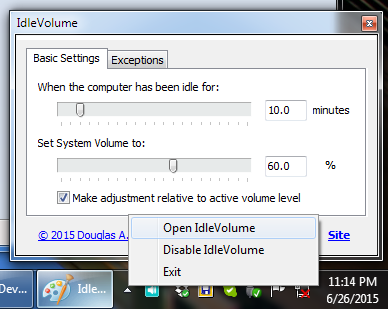
Once the software has been launched the icon will become available in your system notification area.

Left-click the icon to open the main window to configure the software, or right-click the icon to open the popup menu.
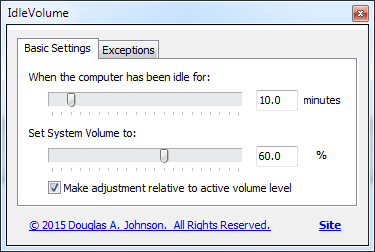
There are only three options to set: the amount of idle time that must occur before IdleVolume does its job, the volume level to set when it kicks in, and whether the volume adjustment is relative to the starting volume or not. The default settings are 10.0 minutes and 30.0%, with the level being absolute (not set relative to the active volume level) respectively. Adjust each slider to your liking by dragging, or by entering the value directly.
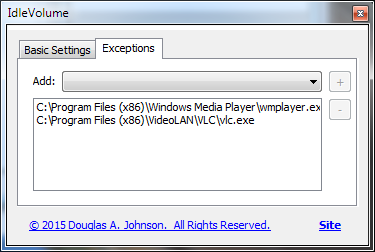
Version 2.0 of IdleVolume added a software exception list. If you would like for IdleVolume to not adjust the volume level when certain applications are active, select the application from the drop-down list on the Exceptions page (it has to be running to show up in the list), and click the + button to add that application to the exception list. For an exception to take effect, the selected application must be the foreground (focused) application. If it is merely running in the background IdleVolume will still adjust the volume when the computer been idle for the preset amount of time.
When IdleVolume has kicked in and changed your system volume level the icon
will turn yellow
 to indicate that it is active. Pressing a key or moving your mouse will
deactivate it and the icon will return to white
to indicate that it is active. Pressing a key or moving your mouse will
deactivate it and the icon will return to white
 .
.
Click the Close box of the main window to minimize the application, or hold Shift while clicking the close box to exit the software. You can also exit by right-clicking the notification icon and selecting Exit.
